One-hand games for Android that work offline: what to check before your commute
If you play on the way to work or school, the phone is usually in one hand while the other holds a rail, a strap or a bag. On a long bus ride the signal comes and goes. So the game you want has to do two things at once: play with one thumb, and keep going when the connection drops. Store pages rarely tell you either clearly.
Below is what makes a game comfortable to play one-handed, a two-minute test you can do at home, and where our own game fits. We make Ant Zigzag, so read that part as the developer's account, not a review.
What makes a game one-handed
A game can be simple and still need two hands. These are the things that decide it:
- An upright screen. A landscape game needs two hands to hold steady. A portrait game sits in one palm.
- Controls within thumb reach. Best is a game you can control by touching anywhere, or near the bottom of the screen. Buttons in the top corners are a stretch, more so on a big phone.
- One input at a time. If you have to steer and press a button at the same moment, like a joystick plus a fire button, one thumb can't do it.
- Short rounds. A level that ends in under a minute fits between stops. A 15-minute match doesn't.
- It pauses on its own. Sooner or later you'll need your hand for the rail or your fare. A game that pauses when you leave it or lock the screen saves the round.
- Easy to mute. Useful on a crowded bus.
Kinds of games that usually fit, and ones that usually don't
Usually fine with one thumb: puzzle and match games, solitaire and other card games, word games, one-tap arcade games, swipe runners, and steering games where you drag to turn.
Usually awkward: shooters with two on-screen sticks, racing games with pedals on both sides, fighting games, and most games that only run in landscape.
That's a rule of thumb, not a guarantee. Two games of the same kind can put their buttons in very different places, so it's worth testing the one you have in mind.
Make sure it also works offline
One-handed and offline are separate questions. A game can be perfect for one thumb and still stall the moment the bus leaves signal behind, usually because of ads, a sign-in check, or extra files it downloads after install.
The quick check: open the game once on Wi-Fi, turn on airplane mode, close and reopen it, play a level, then close and reopen again to see that your progress was saved. Our guide to games to play on a plane without Wi-Fi goes through this step by step. If you're on prepaid data, offline games without Wi-Fi or data shows how to see what each game uses.
A two-minute one-hand test at home
- Stand up and hold the phone in the hand you'd use on the bus. Put the other hand in your pocket.
- Turn off auto-rotate from Quick Settings, so the screen doesn't flip when you tilt the phone.
- Play one full level with your thumb only.
- In the middle of a level, press Home or lock the screen, then come back. Did the game pause, or did you lose the round?
- Try to reach every button you needed: pause, retry, next level, sound.
If you had to change your grip more than once, the game will be awkward on a moving bus.
Android also has a one-handed mode that pulls the whole screen down so top buttons come within reach. On a Pixel it's under Settings > System > Gestures > One-handed mode. On Samsung it's Settings > Advanced features > One-handed mode. On other phones, search "one-handed" in Settings. It shrinks the game too, so it's more useful for menus than for play.
Where Ant Zigzag fits
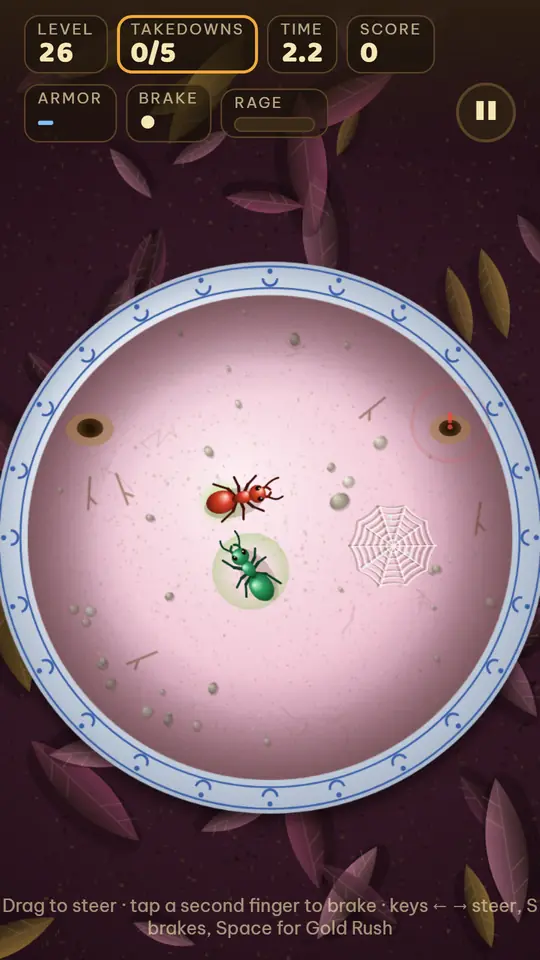
Ant Zigzag is an arena game with short levels. You steer one ant, Kim, who never stops crawling, and you win by ramming the back half of other ants while staying away from their heads. Here's how it does on the checklist:
- Upright screen. It's made for holding the phone upright, and the web version installs in portrait.
- Touch anywhere. Put your thumb down anywhere on the arena and drag. Steering is measured from where you first touched, so your thumb can stay low on the screen. Lift your thumb and Kim keeps crawling straight.
- Short levels. In our own test runs with a bot player, winning a level took between 5 and 32 seconds. People take longer and need a few retries, but the levels are built to be short.
- Pauses itself. Switch to another app or lock the screen mid-level and the game pauses. The pause button is in the top corner, which is a stretch for a thumb, so pressing Home is often easier. Leaving a level from the pause menu restarts that level.
- Sound. The sound button is on the map screen, and the game remembers your choice.
Where it isn't fully one-handed:
- Brake, from level 11. While you steer, a second finger touching the screen makes Kim stop short. With one hand that's hard to do. Brake is optional, but some levels are easier with it. On level 17, for example, the arena shakes every few seconds and braking keeps you from being thrown.
- Gold Rush, from level 21. When the bar fills, a GOLD button appears at the bottom right. Tapping it means lifting your thumb off the steering for a moment. It's in easy reach for a right thumb and a stretch for a left one.
On the offline side, the game code makes no network requests. There are no ads, no in-app purchases, no sign-in, and your progress is saved on your device. There are 50 levels across 5 lands, with 5 boss fights. The full rundown of how it plays is in ant games that aren't colony sims.
How to try it
Ant Zigzag: Kim Saga is free on Google Play for Android. You can also play the same game in your browser. Open it once while online and it keeps working offline after that. On iPhone, the iPhone guide shows how to add it to your Home Screen.
The browser version saves progress in that browser, and it doesn't carry over to the Android app.
Read more
- Offline games with low MB for Android: how to check the real size before you install
- Games to play on a plane without Wi-Fi: how to make sure they work
- Offline games without Wi-Fi or data: how to check a game won't use up your load
- Can you play slither.io offline? io games that work without internet
- Ant games that aren't colony sims: how Ant Zigzag plays