Games to play on a plane without Wi-Fi: how to make sure they work
The games that work on a plane without Wi-Fi are the ones that keep everything on your phone: the levels, your progress, and anything they show you. You usually can't tell which games those are from the store page, so the reliable way is to test them in airplane mode the night before you fly.
Below is what tends to break a game once it loses its connection, which kinds of games usually hold up, a short test you can run at home, and a few settings that make a flight easier. We make an offline game ourselves, Ant Zigzag, and there is a section on it near the end, written as the developer's account rather than a review.
What usually breaks a game offline
A game can be described as "offline" and still need the internet for parts of what it does. The common culprits:
- Ads. The game reaches out for an ad between rounds or on the menu. Some just skip the ad when there's no connection. Others pause, show an empty box, or wait for an ad that never loads.
- Sign-in at launch. If a game checks your account every time it starts, it may stop at the title screen.
- Downloads after install. Some games install small and then fetch levels, art or voice files the first time you open them. If that first launch happens on the plane, there is nothing to fetch from.
- Server-side systems. Daily rewards, energy and lives, events and shops often live on a server. Offline, they may be greyed out, or the game may not let you play without them.
- Cloud saves. A game that keeps your progress online may lose a session played offline, or ask you to pick between two saves when you land.
None of this makes a game bad. It just means it isn't a good choice for six hours in airplane mode.
Which kinds of games usually hold up
Games that ship the whole game in the install tend to do well. That usually means single-player games with a fixed set of levels: puzzle games, card and solitaire games, word games with a built-in dictionary, story and adventure games, and arcade games with levels instead of live events. Games you buy once often fall in this group too, because they don't rely on ads or a shop to earn money.
The ones to skip are anything built around other players: online multiplayer, io games where you join a server, and live-service games with seasons and events. Even if they open, there's no one to play against.
These are tendencies, not rules. The test below is what tells you for sure.
The night-before test
Do this at home, on Wi-Fi, a day or two before you leave.
- Update everything first. Install pending updates for the games you plan to play. Some games won't start until they are on the latest version, and you don't want to find that out at the gate.
- Open each game once while online. Play past the first level or tutorial so any extra downloads can finish.
- Switch on airplane mode and check Wi-Fi. On many recent Android phones, airplane mode remembers whether you turned Wi-Fi back on last time, so make sure Wi-Fi is actually off too.
- Close the game fully and reopen it. Swipe it away from the recent apps screen, then start it again in airplane mode. A game that was already running can hide problems that show up on a fresh start.
- Play a level, close, reopen. Check that the level you just finished is still saved.
A game that passes all five will very likely behave the same in the air. If you also want to know whether a game has ads or in-app purchases before installing it, we covered that in how to check for games with no ads or in-app purchases.
Settings that help on the flight
- Brightness down. The screen is one of the biggest drains on the battery, and a cabin is darker than most rooms anyway. Bring a charging cable in case your seat has a USB port.
- Sound. Pack headphones, or check the game has a way to turn sound off. Cabin announcements will interrupt you either way.
- Notifications off. Do not disturb keeps your phone quiet when it reconnects on landing.
- Pause behavior. Meal service, the seatbelt sign or someone needing to get out will cut into a level. Games that pause when you leave them, or at least have a pause button, cope better than ones that keep running.
- One-handed controls. In a narrow seat, holding a drink or with an armrest in the way, games you can steer with one thumb are simply easier.
If you are handing the phone to a child, turn on "Require authentication for purchases" in the Google Play app settings before you go, so a stray tap can't buy anything. And only give them games that passed the test, since a game stuck on a loading screen is worse than no game.
Where Ant Zigzag fits
Ant Zigzag is a short-round action game. You steer one ant, Kim, around an arena and win by ramming the back half of the other ants while staying away from their heads. If you want the full rundown of how it plays, see ant games that aren't colony sims.
How it does against the points above:
- Nothing online. The game code makes no network requests, so every one of the 50 levels plays the same way in airplane mode. There are no ads, no in-app purchases, no sign-in and no daily rewards. Upgrades are paid with sugar you earn by playing.
- Progress stays on your phone. Nothing is synced to a server, so there's no second save to reconcile when you land.
- Easy to stop. There's a pause button, and the game is set to pause itself if you switch to another app mid-level. If you quit from the pause screen, you start that level again from the beginning.
- Sound can be turned off with the note button on the level map.
- One finger. You touch and drag to steer. From level 11 a second-finger tap brakes, which is easier with the phone on a tray table.
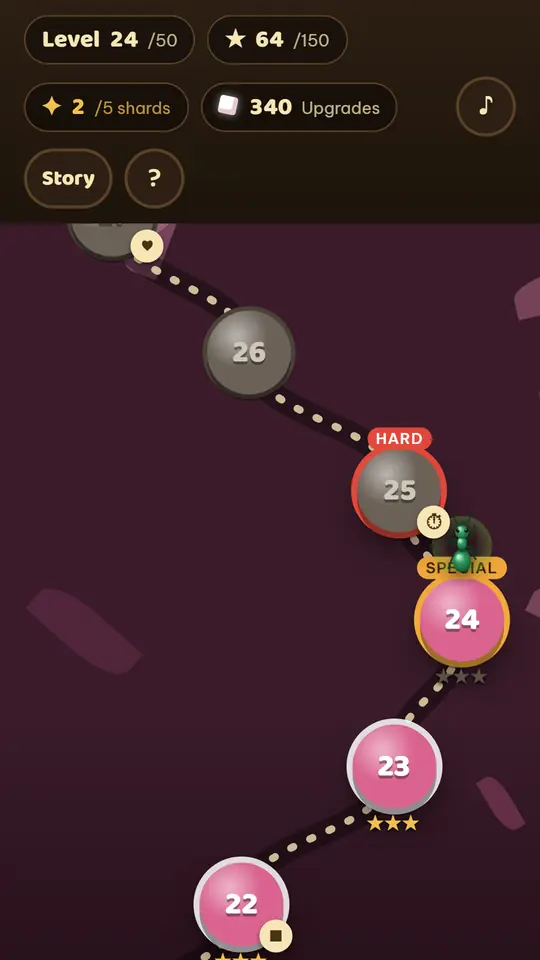
To be honest about length: 50 levels won't fill a long-haul flight on its own. We estimate a first run through all of them takes one to two hours. That figure comes from automated runs through the levels, not from timing real players. Stars and upgrades give you reasons to replay levels, but pair it with something longer if you're flying for half a day. There is also no online play, no playing with friends and no leaderboard.
How to try it before your flight
Ant Zigzag: Kim Saga is free on Google Play for Android. Install it before you leave and run the night-before test on it: open it once, switch to airplane mode and play a level. On iPhone, play the same game in your browser: open it in Safari and tap Share, then Add to Home Screen. It is built to work offline after the first visit, so run the same test there too. The iPhone guide has the steps in more detail.
One thing to know: the browser version saves progress in that browser, and it doesn't carry over to the Android app.
Read more
- Offline games without Wi-Fi or data: how to check a game won't use up your load
- One-hand games for Android that work offline: what to check before your commute
- Games with no ads or in-app purchases: how to check before you install
- Ant games that aren't colony sims: how Ant Zigzag plays
- Game offline không quảng cáo cho cả nhà (in Vietnamese: five checks for parents before installing a game)
- Ant Zigzag privacy policy