Offline games with low MB for Android: how to check the real size before you install
If your phone has 32 GB or less and it's already full of photos and chat apps, a game's size matters. The trouble is that the number you see before you install is usually the download, not the space the game will end up taking. Some games stay close to that number. Others grow several times bigger in the first few minutes.
Below is where the extra space comes from, how to check what a game really uses on your phone, and what a small size does and doesn't tell you about how a game runs on an older phone. We make an offline game ourselves, Ant Zigzag, and there's a section on it near the end, written as the developer's account rather than a review.
Why the size on the store isn't the whole story
A game can take space in four places, and only the first one shows up in most "low MB games" lists:
- The download. What Google Play sends to your phone. It's packed, so it's smaller than what ends up on the phone.
- The installed app. Once unpacked, the app itself takes more room than the download did.
- Files it fetches after install. Many bigger games install small and then download levels, art or voice files the first time you open them, often behind a "downloading resources" screen. For a big game, this is often where most of its size comes from.
- Data and cache. Your save, settings, and temporary files the game keeps around. Games with ads and live events tend to build up more cache over time, because they keep downloading new content.
Updates also add up. A game that updates every week downloads every time, even if its size barely changes.
How to check what a game really uses
Do this on Wi-Fi, so the test doesn't cost you data:
- Install the game and open it once. Play past the tutorial or the first level. If the game is going to download more files, it usually does it now.
- Open your phone's Settings, then Apps. Find the game and tap Storage (on some phones it's called Storage & cache).
- Read the three numbers. You'll see the app size, the data and the cache, plus a total. The labels differ a little between brands, but the total is what the game takes on your phone right now.
- Check again after a week of playing. If the total keeps climbing, most of it is usually cache or newly downloaded content.
One warning about the buttons on that screen. Clear cache only removes temporary files, and the game rebuilds what it needs. Clear storage (or Clear data) wipes the game's data, and for a game that saves on your phone, that includes your progress. Don't press it unless you're ready to start over.
While you're there, a quick airplane-mode test tells you whether the game needs any of those extra downloads to keep working. Our guide to offline games without Wi-Fi or data goes through it, along with how to see how much mobile data each game has used.
Low MB doesn't mean it runs well on an older phone
Size and smoothness are two different things. A small game can still be heavy on the processor, and a phone with 2 GB or 3 GB of RAM can struggle with a game that fits easily in storage. Neither the store page nor the MB number tells you how a game will run on your particular phone.
What does help:
- Check the Android version the game needs. The store page lists it under the app's details. A game that needs a newer Android than yours won't install at all.
- Close other apps before you play. On a phone with little RAM, a browser with many tabs or a video app in the background takes memory the game could use.
- Keep some storage free. A phone that is almost full gets slower in general, not only in games.
- Try a few levels, then decide. If it stutters, gets hot or drains the battery quickly, uninstall it. That's the only test that really counts on your own phone.
Ways to keep space free without losing your games
- Archive instead of uninstall. Recent versions of the Play Store can archive apps you don't use: the app is removed, but its data and icon stay, and tapping the icon downloads it again. You'll find it in the Play Store under your profile, then Settings, then General, as Automatically archive apps. The names can differ by phone and Play Store version, and it only works for apps that are still on Google Play.
- Clear cache on the biggest games from time to time, using the steps above.
- Consider a browser version. Some games also run in the browser and can be added to the Home Screen. They don't take space as an installed app, though the browser still stores the game's files and your save.
Where Ant Zigzag fits
Ant Zigzag is a short-round action game. You steer one ant, Kim, with one finger and win by ramming the back half of other ants while staying away from their heads. From level 11 a second finger lets you brake. There are 50 levels across 5 lands, with 5 boss fights and 10 special levels. The full rundown is in ant games that aren't colony sims.
How it does against the points above:
- Small package. The app bundle we sent to Google Play for version 1.0.1 is 5.4 MB. Google Play builds the download for each phone from that bundle, so the size it shows you will be a little different, and the installed size will be larger. We haven't measured the download and installed size on a phone yet, and we'll add both here once we have.
- Nothing to download after install. All 50 levels, the story and the sound are inside the app. The game code makes no network requests, so there's no resources screen on first launch and no new content arriving in the background.
- Little data and cache. There are no ads, no in-app purchases, no sign-in and no events, so there's nothing being fetched to fill the cache. Your progress is saved on your phone.
- Android 7.0 or newer. That's the oldest version the app installs on.
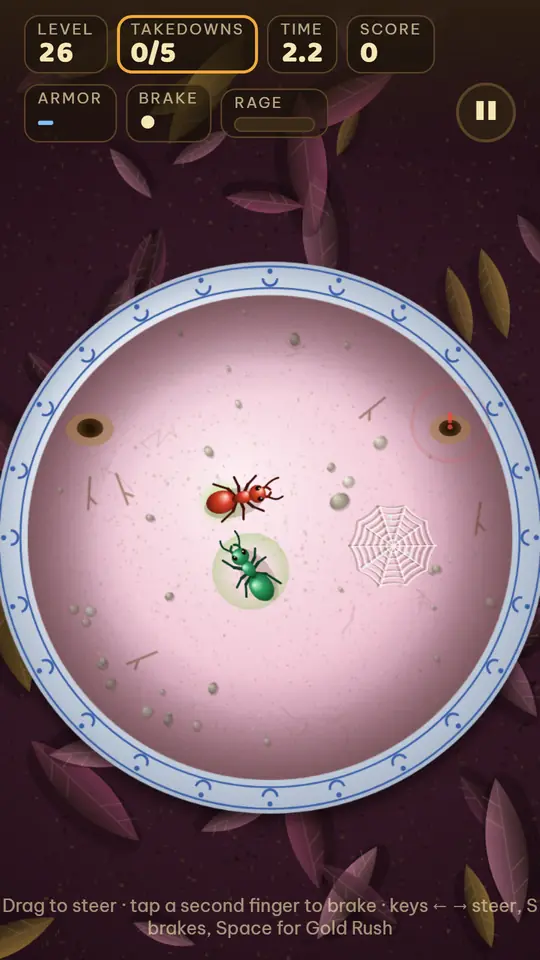
To be clear about what we don't know yet: we haven't measured Ant Zigzag on low-end Android phones, so we're not going to promise it runs smoothly with 2 GB of RAM. The game draws through Android System WebView, the part of Android that shows web pages inside apps, so keeping that updated from the Play Store is a good idea. If you try it on an older phone, we'd like to hear how it runs: [email protected].
And what it doesn't have: no online play, no playing with friends and no leaderboard.
How to try it
Ant Zigzag: Kim Saga is free on Google Play for Android. Before you install it, you can check its size with the steps above. You can also play the same game in your browser. The first visit downloads about 2.6 MB of files, everything the game needs (we measured that on October 19, 2026), and after that it plays offline. On iPhone, the iPhone guide shows how to add it to your Home Screen.
The browser version saves progress in that browser, and it doesn't carry over to the Android app.
Read more
- Offline games without Wi-Fi or data: how to check a game won't use up your load
- One-hand games for Android that work offline: what to check before your commute
- Games with no ads or in-app purchases: how to check before you install
- Games to play on a plane without Wi-Fi: how to make sure they work
- Ant games that aren't colony sims: how Ant Zigzag plays